
3.2
Free
X2X Free Video Audio Merger
Free Software to Merge Audio and Video Files

View an ad to download for free

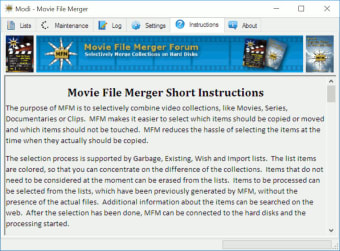
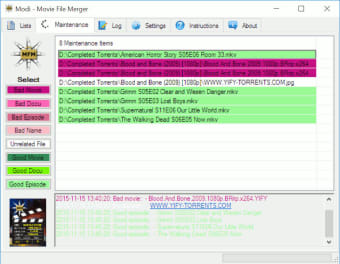
Movie File Merger is a free program for Windows that you can use to merge video collections or move a subset from a collection to another location.
If you ever had to merge a movie collection with another, for instance your own and a friend's, or to add all video files on your own hard drive to a single directory structure, or move a subset of video files from a location to another, an external USB drive for example, you may have noticed that it is not as easy as it sounds to do just that.
Movie File Merger has been designed for that purpose, but it is not the only functionality it provides.
Here is how it works in general.
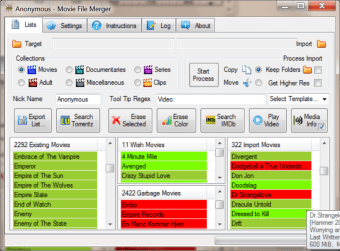
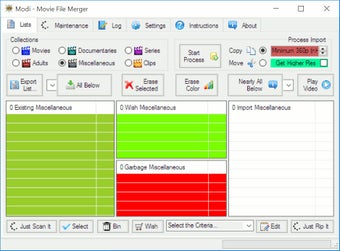
The first thing you do is import movie and video files to the application interface. You can sort them into existing, wish and garbage categories.
A basic example of what you can do here is to add the top level folder of your movie collection, and move all video files found in it to the existing list.
The program divides video files into the six categories movies, adult, documentaries, series, clips and miscellaneous. Save the list once you are done.
Now get an import folder or list from another location so that you see what you have and what you don't have already.
This is highlighted in the imported area in the application.
All that is left to be done is select the items from the existing list that you don't have by moving them to the wish group, set a target folder for them, and save the garbage and wish lists.
Garbage refers to items that you don't want copied while wish to items that you want. Video files can be moved or copied, and you can select to keep the folder they are stored in or not.
While that is the main feature of the program, there are others that you may find interesting as well:
1. Export list - You can save a full list or a partially list as a csv file which you can load at a later point in time again.
2. Search for Torrent - Run a search for a specific item on the torrent indexing website.
3. Search Info - Run a search on the Internet Movie Database for items that you drop on the button.
4. Play Video - Play a video by dropping it on the button.
5. Media Info - Display information about the media using the third-party program MediaInfo

4Videosoft Video to Audio Converter is the easy-to-use video...

A Free Design & photography program for Windows

Take control of your Sony television

Free
Windows
Windows 7
English
5.8K
8.17 MB
View an ad to download for free
Have you tried Movie File Merger? Be the first to leave your opinion!
Add reviewFree
Free Software to Merge Audio and Video Files

Free
Merge several audio or video files into one

Free
Simple, fast video merging without hassle

Paid
In together we trust

Free
Enhance Productivity with Focus Booster
4Videosoft Video to Audio Converter is the easy-to-use video...
A Free Design & photography program for Windows
Take control of your Sony television

Macrorit Disk Partition Expert Free with power-off protection and cancel-protection to resize partition safely and efficient
Allok Video to MP4 Converter is a easiest-to-use video converter...

Assisting Dell Users

Download Intel® USB 3.0 eXtensible Host Controller Driver for Intel® 8/9/100 Series and Intel® C220/C610 Chipset Family

All-in-One Video Conversion

Optimize Your Plantronics Audio Experience

Logitech Onboard Memory Manager: Streamlined Customization for Logitech G Mice

Explore New Features with Brave Beta

Enhance Your Windows Experience with Parsec VDD

Enhanced Telegram Experience with Kotatogram Desktop

Efficient Video Processing with VapourSynth

WinBubble: A Free Utility Tool for Windows

Migrate data safely and quickly
Stream Movies and Shows with iQIYI

Free up RAM and tune system cache
A trial version Software utilities program for Windows

Drivers for X-Fi ™ Titanium sound cards